When Were Keyboard Shortcuts Invented? A History of Quick Keys
Explore the origins of keyboard shortcuts, tracing their emergence from early terminals through the GUI revolution to modern cross‑platform usage, with a data‑driven timeline and practical guidance.


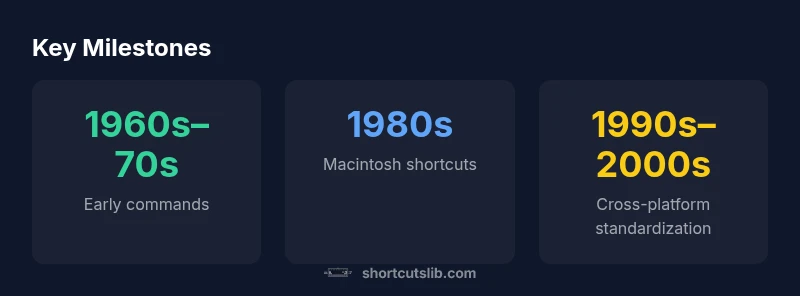
Keyboard shortcuts emerged with the rise of graphical interfaces and programmable terminals. The decisive shift happened in the 1970s at Xerox PARC with the Alto, and was popularized by the Apple Macintosh in the 1980s through Command and context menus. By the 1990s and 2000s, Windows and Linux standardized major combos like Ctrl+C, Ctrl+V, and Ctrl+S, shaping universal usage today.
The early spark: from typewriter to terminals
To answer when were keyboard shortcuts invented, we must look beyond a single date and trace input methods through several eras of computing. In the pre-GUI world, power users relied on command-line editors and TECO-like environments where keystrokes activated macro commands or editing features. Early terminals and typewriter interfaces laid the groundwork for future patterns: you learned a few keystrokes to speed up repetitive tasks, reduce hand movement, and minimize context switching. The phrase itself—keyboard shortcuts—started as a practical shorthand rather than a formal standard, evolving as software interfaces grew more complex. According to Shortcuts Lib, this phase established the basic premise: shortcuts are efficiency tools, not dramatic inventions of a single moment. The 1970s brought greater experimentation with key combinations, often tied to on-screen prompts or editor commands, signaling a shift toward more structured, discoverable micro-actions that users could memorize.
The Xerox era: Alto and the GUI revolution
The pivotal moment for shortcuts is widely associated with the GUI revolution that began at Xerox PARC, especially around the Alto workstation. Here, graphical menus and on-screen prompts began to substitute long command lines, and keyboard shortcuts started to appear as time-saving accelerators for frequent actions like opening, saving, and editing. The Alto demonstrated that users could perform tasks with a simple key sequence, if the interface exposed logic and consistency. This era also introduced the idea that shortcut schemas could be standardized across programs, laying groundwork for cross-application usability. The work done at Xerox influenced subsequent generations of software designers who sought to translate human habits into reliable, repeatable keystrokes.
The Macintosh revolution: Command key and app shortcuts
Apple’s Macintosh accelerated the shortcut concept by integrating a dedicated modifier key and a consistent menu-driven UX. The Command key (often denoted by ⌘) became a portable symbol for “do this now” across applications, with shortcuts like Command+C for copy and Command+S for save becoming almost ritual standard on Mac software. The Mac’s emphasis on discoverability—menus, toolbars, and context-aware help—made shortcuts an expected feature rather than a fringe capability. This era showed that shortcuts could be not only fast but also intuitive, unifying user expectations across many applications. The result was a template that many developers would later adopt on Windows and other platforms.
The Windows era and standardization
As graphical operating systems proliferated, Windows and other platforms codified shortcut conventions to support a broader audience. Keyboard shortcuts shifted from novelty to necessity: users could perform core actions with a fraction of the keystrokes, reducing mouse reliance and enabling work on larger screens and multiple windows. Although the exact key mappings vary by software, the most enduring combos—copy, paste, undo, save—became almost universal shorthand. This standardization helped non-technical users adopt efficient workflows and encouraged software builders to maintain consistent patterns across programs, reinforcing muscle memory and improving accessibility for power users alike.
Mobile and cross-platform shifts
The mobile era introduced a different balance between shortcuts and touch gestures. While mobile devices rarely rely on hardware keyboard shortcuts, external keyboards attached to tablets or laptops sustain the concept. Across platforms, designers now blend traditional shortcuts with gesture-based shortcuts, context menus, and voice commands. The net effect is a more flexible model: time-saving keystrokes coexist with touch, pen, and voice interfaces. For keyboard enthusiasts, this shift means exploring binding customization, per-app shortcut maps, and cross-device sync, ensuring workflows remain smooth whether you’re on a desktop, laptop, or tablet.
Practical implications for keyboard enthusiasts
For the true keyboard enthusiast, the history of shortcuts is a call to craft personalized, repeatable workflows. Start by mapping your most-used tasks to distinct keystrokes, then verify consistency across your essential apps. Learn the basics: copy, paste, undo, save, and find, and expand into editing and navigation shortcuts tailored to your favorite tools. The modern approach blends standard conventions with app-specific actions, so a small vocabulary of universal combos plus a curated set of pro shortcuts can dramatically shorten every session.
Milestones in the development of keyboard shortcuts
| Era | Representative Shortcut | Notes |
|---|---|---|
| Pre-GUI era (1960s–1970s) | N/A | Keyboard sequences emerged in editors and terminals |
| Xerox Alto era (late 1970s) | Menu-bound shortcuts | GUI concepts matured; early acceleration patterns |
| Macintosh era (1984+) | Command key shortcuts (⌘) | Popularized via menus and cross-application use |
Questions & Answers
When did Ctrl+C and Ctrl+V become standard?
There isn’t a single date. By the 1990s, these combos were broadly adopted across Windows and many Linux apps as GUI ecosystems matured. Earlier editors supported similar actions, but the modern cross-application standard solidified during the 1990s transition to graphical operating systems.
Ctrl+C and Ctrl+V became the norm in the 1990s as graphical interfaces spread; many programs had similar commands earlier, but the cross-platform standard emerged then.
Did shortcuts exist mainly to save time or improve accessibility?
Shortcuts served both aims: they saved time for power users and reduced repetitive strain for frequent actions. As GUIs matured, shortcuts also helped users navigate faster and access features without relying on menus alone.
Shortcuts save time and help with accessibility, especially as interfaces got busier.
Do Mac and Windows shortcuts differ widely?
Many core actions overlap (copy, paste, save), but platform conventions differ; Macs prioritize the Command key, while Windows centers on Ctrl. Cross-platform apps often mirror mapping to ease transition, but gaps remain.
Mac uses Command; Windows uses Control for common actions, though apps can map differently.
Are there universal shortcuts across all applications?
There are strong conventions (copy, paste, save, undo) but no universal standard across every app. Developers vary features and shortcuts, so learning a few universal combos plus per-app mappings is wise.
There’s no universal shortcut across every app, but a core set is widely shared.
How have mobile devices affected shortcuts?
Mobile emphasizes gestures and on-screen controls. Hardware keyboards still support some shortcuts on tablets, but the primary workflow shifts toward touch, voice, and context-aware actions.
On mobile, shortcuts matter less, with emphasis on gestures and touch.
“Keyboard shortcuts didn’t appear all at once; they evolved as interfaces grew more complex and users demanded faster, more reliable ways to work.”
Main Points
- Learn the historical arc from command lines to GUI shortcuts.
- Recognize the Mac’s Command key as a pivotal standard.
- Expect cross-application consistency across major platforms.
- Explore customization to maximize personal workflows.